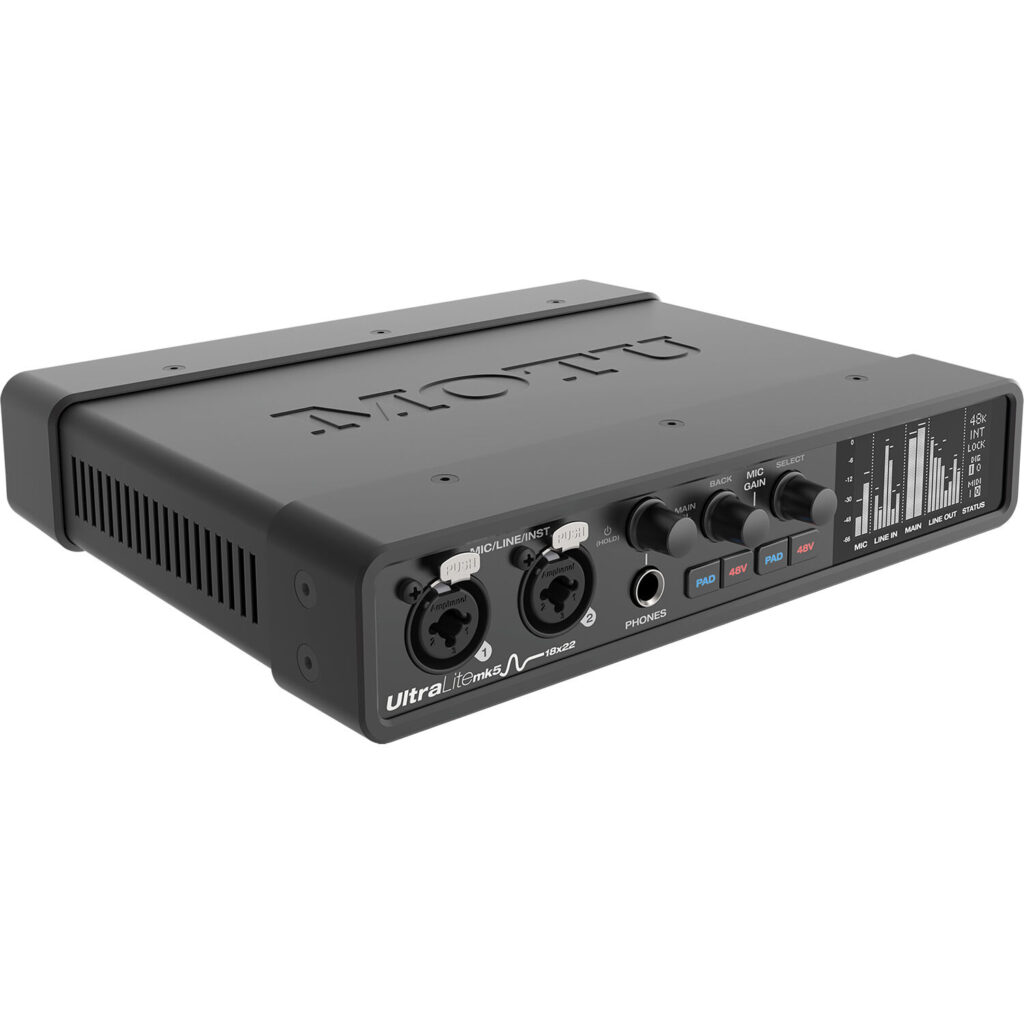
MOTU UltraLite-mk5 puts a substantial set of analogue and digital paths into a compact interface, with hardware mixing and effects controlled through CueMix. Its role is broader than recording one microphone: it can organise line sources, performer monitoring and multiple outputs in a small studio or live setup. The headline input count includes digital channels, however, and there are only two onboard microphone preamps. A clear channel plan is therefore more important than the impressive total alone.
Research-based review. This assessment draws on manufacturer documentation and the original independent evaluations linked below. Audio Review has not performed a hands-on test of this model.
Two preamps, many other paths
The front combo inputs serve microphones, instruments or line sources, with additional line inputs at the rear. That is useful for a studio combining a voice or guitar with several synthesiser or processor outputs. It is less convenient for a session requiring a large number of microphones unless an appropriate external preamp arrangement is included.
List the sources that must record simultaneously and identify their output levels. A line input is not a substitute for a microphone preamp simply because both eventually become DAW channels. Likewise, stereo instruments consume two mono paths. This exercise can reveal whether the compact UltraLite arrangement is unusually efficient for the studio or whether a larger interface with more preamps would be simpler and less expensive overall.
CueMix is a major part of the product
The hardware mixer can provide monitor feeds without relying on the DAW’s normal buffer path. EQ, dynamics and reverb make it possible to create a more comfortable performer feed. Check whether processing is being monitored only or included in the recorded signal before committing an important take.
A singer may prefer some reverb while the engineer wants to retain a dry recording. A live performer may need a click in headphones but a different feed to the venue. These are routing problems, and the value of CueMix is the ability to solve them deliberately. Save and label a working configuration rather than recreating it under pressure. Flexibility becomes useful when the desired signal path is clear to the person operating it.
What the original evaluation supports
Sound On Sound’s original review is enthusiastic about the conversion quality, flexible mixing and monitor facilities. It also finds the front-panel layout better suited to a rack-style position than an ideal desktop control surface. That combination supports a strong recommendation for capability, with a practical ergonomics qualification.
Try the front controls from the seat or rack position in which the unit will be used. A clear display is valuable only if it can be read comfortably, and an encoder shared between functions may be less direct than separate large controls. The correct interface is not always the one with the most paths; it is the one whose controls and software let the owner work confidently without continually interrupting a session to find a setting.
Digital expansion has rate-dependent limits
The optical port can use ADAT or stereo optical S/PDIF, with the choice affecting the available channels. ADAT provides fewer channels at double sample rates and is disabled at the highest supported rates. The technical table preserves those limits rather than presenting the maximum file rate and maximum channel count as simultaneous promises.
Before adding an expander, confirm format, sample rate and clock source at both ends. An optical cable alone does not make incompatible modes communicate. Build a test session with every required channel armed and verify the recorded result before relying on the system for a performance. For many projects, a practical standard rate with all required inputs is more useful than selecting a higher rate that removes the expansion channels.
Many outputs require a monitoring plan
The line-output count can support several destinations, but each needs an intended signal and level-control arrangement. A pair of powered monitors, an external headphone amplifier and a hardware processor have different requirements. Keep the routing documented so that a loudspeaker feed is not accidentally changed while adjusting another destination.
The original review describes firmware developments including monitor switching and talkback facilities. Verify current CueMix and firmware behaviour rather than assuming an early screenshot describes the present unit. If using multiple loudspeakers, plan calibration and safe level control as well as output allocation. Having enough sockets is one necessary part of a system, not proof that the complete playback arrangement is correctly configured.
Power and computer compatibility
UltraLite-mk5 requires its external power supply. The USB connection does not make it a bus-powered interface, so include that supply and access to power in a mobile-recording plan. Check the correct regional accessories and current operating-system support before purchase.
The practical latency of a software-monitored signal depends on the driver, computer, sample rate, buffer and project. A number from a published test should not be promised for every laptop. Test a realistic session and use the hardware monitor path where appropriate. If a particular plug-in must be heard during performance, establish a stable buffer setting before the session rather than discovering the computer’s limits after the performer is ready.
Loopback, presets and value
Loopback can return computer playback to recording or streaming software, but its source and destination must be chosen carefully. Prevent the return from feeding itself, and check the final recording rather than relying only on the live monitor. A short rehearsal can uncover a routing mistake that would otherwise ruin a long session.
The UltraLite value case is strongest when several line sources, digital I/O and independent routing are used regularly. Compare a simpler M4 for smaller sessions and an interface with more preamps for microphone-heavy recording. Include external converters, headphone distribution and cables in the price comparison. A compact but capable system can be excellent value, while the same device can be unnecessary complexity for a single-input routine.
Alternatives to consider
MOTU M4: M4 is worth considering when the session is simple and the additional line paths, digital I/O and hardware mixer would go unused. Compare the actual source count and monitoring routine before paying for flexibility that adds setup work without a benefit.
Focusrite Scarlett 4i4 4th Gen: Scarlett 4i4 offers another compact route for a small microphone-and-line-source setup. Compare the simultaneous channel and monitor requirements; if several additional microphone preamps are needed, include their cost or compare a larger interface rather than treating every UltraLite input as a microphone input.
MOTU UltraLite-mk5 key specifications
- Role
- USB audio interface and hardware mixer
- Maximum headline I/O
- 18 inputs / 22 outputs, including digital and headphone channels
- Mic/line/instrument preamps
- Two front combo inputs
- Additional analogue inputs
- Six line inputs
- Analogue line outputs
- Ten
- Headphone output
- One stereo output
- Digital I/O
- ADAT or optical S/PDIF; coaxial S/PDIF
- ADAT channels
- Eight at 44.1/48 kHz; four at 88.2/96; disabled above
- MIDI
- DIN input and output
- Control software
- CueMix 5
- Power
- External supply required
- Maximum sample rate
- 192 kHz with reduced digital I/O availability
Verdict
UltraLite-mk5 is a highly versatile compact interface whose hardware mixer and connection set can support a serious hybrid studio. The original review provides strong support for its sound and routing capability, with sensible reservations about desktop ergonomics.
Choose it from a complete source and output plan, accounting for external power and rate-dependent digital channels. It is especially attractive when line connectivity and monitor routing matter together. For a simpler session or many microphones without external preamps, a different interface can be the more efficient purchase.
Primary documentation and independent reviews
MOTU official UltraLite-mk5 product announcement · MOTU UltraLite-mk5 official user guide · Sound On Sound original UltraLite-mk5 evaluation
Editorial record
Sources and updates
Product specifications and factual claims were checked against Official MOTU UltraLite-mk5 product page ↗. Scores and buying advice follow our category-specific editorial methodology.
- Published
- November 17, 2026
- Last updated
- November 17, 2026