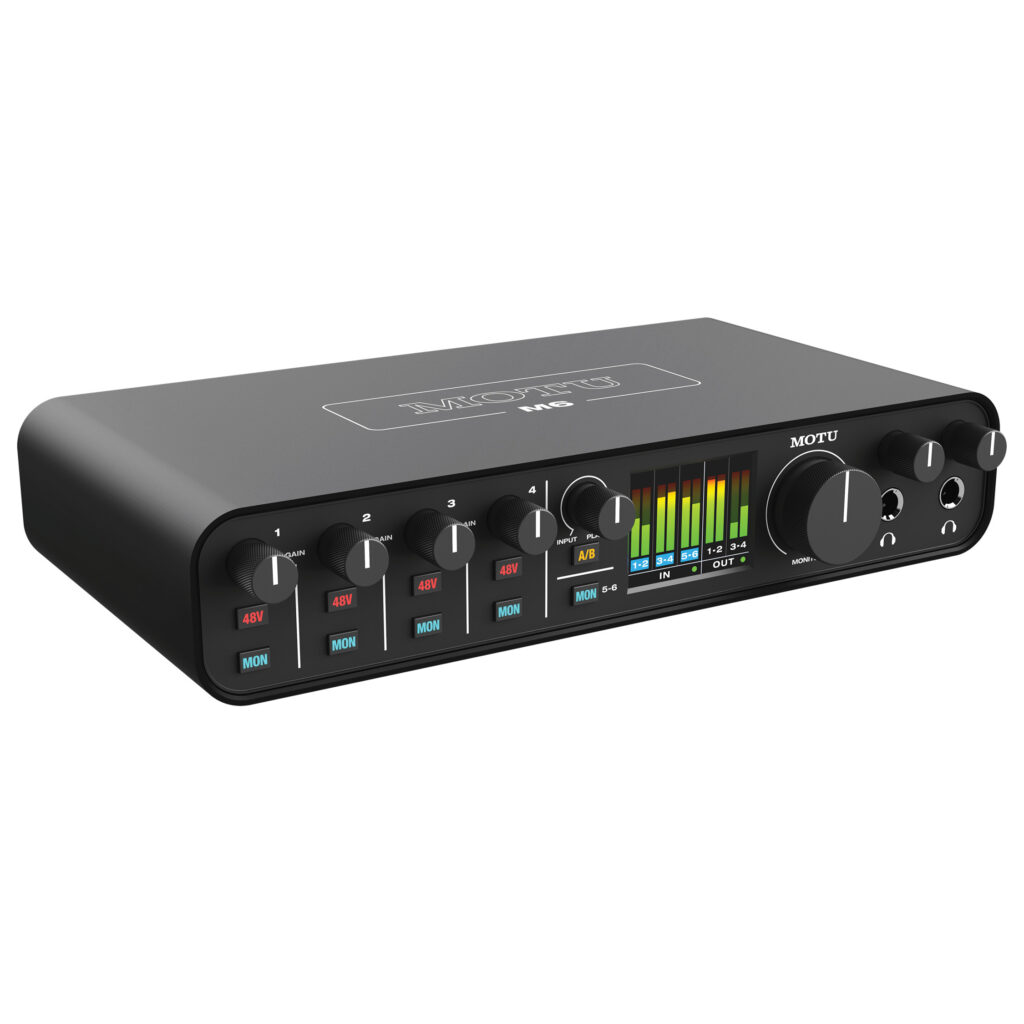
MOTU M6 is built for the musician who needs more than two microphone inputs but does not want a complicated routing environment between an idea and a recording. Its front-panel controls, clear meters and four preamps are the core attractions. The important compromises appear in monitoring: two headphone sockets do not mean unlimited independent cue mixes, and straightforward hardware control provides less balancing flexibility than a full software mixer.
Research-based review. This assessment draws on manufacturer documentation and the original independent evaluations linked below. Audio Review has not performed a hands-on test of this model.
Six inputs does not mean six microphone preamps
The M6 provides four combination mic/line/instrument inputs and two additional line-only inputs. That is a useful arrangement for several microphones plus a keyboard or other line source. It is not a six-microphone interface unless external preamplification is provided for the line inputs, and it does not offer an ADAT route to add more channels later.
Count simultaneous sources rather than the instruments you own. A stereo keyboard consumes two line channels, while a multi-microphone drum setup can use four preamps quickly. If your normal session fits those connections, the M6 can keep the system simple. If you already expect larger microphone sessions, choosing an interface with the right built-in count or digital expansion may be more economical than working around the limit immediately.
Sound quality and the useful metering
MusicTech’s original review is positive about the clean recording and playback performance, with the clear metering and immediate controls helping the musician work without distraction. That supports the M6 as a serious recording tool. Manufacturer converter and noise figures remain specifications under defined conditions, not an Audio Review measurement of the complete recording chain.
In practice, microphone placement, room sound and gain setting often dominate the result. Use the meters to establish headroom during the loudest representative performance rather than setting gain from a quiet phrase. A low interface noise figure cannot remove traffic, reflections or a noisy microphone. The value of good hardware is providing a reliable foundation so that those creative and acoustic decisions can be made clearly.
Direct monitoring and its balancing limit
Hardware monitoring provides a route to hear incoming signals without the full computer-processing round trip. The M6 makes that route accessible from the front panel. MusicTech’s review also points out the corresponding limit: there is less freedom to balance individual direct-monitor sources independently than in a more elaborate software mixer.
Do not change a good recording gain solely to fix a performer’s preferred listening balance without considering the consequence. Monitoring through the DAW may provide the needed mix flexibility, but then buffer settings, plug-ins and computer performance become relevant. Choose the route according to the session rather than assuming the lowest-latency path automatically provides every cue-mix facility. Simplicity is a genuine advantage when its particular limitations fit the work.
Headphones, alternate speakers and output planning
The two headphone sockets have independent level controls, but their signal choices are not identical. The second can select the alternate output pair, while both can carry the main pair. That can be useful for a performer and engineer arrangement, but is not the same as several unrestricted independent headphone mixes.
The A/B speaker facility also uses the available output pairs. Plan whether outputs 3/4 are needed for another monitor pair, a cue feed or external equipment before assigning several roles to them. The DC-coupled line outputs provide additional possibilities for compatible control-voltage workflows, but that requires deliberate configuration. For normal recording, a clear output map prevents the common problem of discovering a routing conflict only after the musicians are ready.
Computer connection, power and latency
MOTU lists USB-C bus operation with the appropriate host and an included external power adapter for other arrangements and standalone monitoring. The connector shape alone is not enough to establish the power available from every computer, hub or mobile adapter. Check the documented requirements for the exact connection you intend to use.
Latency figures also need their conditions. Sample rate, buffer size, driver, host and software processing all affect the round trip. A manufacturer’s low-buffer result should not be presented as a guarantee for every laptop and project. Begin with current supported drivers and a stable buffer, then reduce it if the session needs more responsive software monitoring. A slightly larger reliable buffer is often preferable to intermittent clicks during a performance.
Loopback, mobile use and overall value
Loopback is useful for combining computer playback with recorded sources in a desktop streaming or podcast workflow. Platform behaviour matters, however, and the desktop driver’s channels should not simply be assumed to appear identically in every mobile application. Confirm the intended input and output devices and test for feedback before a live session.
The M6’s strongest value case is a four-preamp setup that benefits from physical control and uncomplicated operation. It is less compelling for someone who needs ADAT expansion, many independent headphone mixes or detailed standalone routing. Compare the M4 when two preamps are enough and an alternative platform when the monitoring requirements are more elaborate. Buy the channel and control arrangement you need, not the largest combined I/O number you can afford.
Alternatives to consider
MOTU M4: The M4 is the simpler comparison if two microphone inputs are enough. Count the microphones you will record together before paying for the M6, while remembering that line inputs are not extra microphone preamps.
Focusrite Scarlett 4i4 4th Gen: The Scarlett offers a different control and software approach for a smaller microphone count. Compare the monitoring workflow and the actual sources you record, rather than judging by a combined input/output total.
MOTU M6 key specifications
- Computer connection
- USB-C; compatible host connection and power required
- Analogue inputs
- Four mic/line/Hi-Z combination inputs plus two line-only inputs
- Microphone preamps
- Four
- Phantom power
- Individually switched on microphone channels
- Analogue outputs
- Four balanced 6.35 mm TRS; DC-coupled
- Headphone sockets
- Two with independent volume
- Headphone routing
- Main pair on both; alternate 3/4 selection on second socket
- MIDI
- MIDI input and output
- Monitoring
- Hardware direct monitoring; A/B speaker switching
- Sample rates
- 44.1 to 192 kHz
- Digital expansion
- No ADAT
- Standalone monitoring
- Supported with included external power adapter
- Loopback
- Supported desktop-driver paths; platform requirements apply
Verdict
M6 is a convincing interface for musicians who want four microphone inputs, clear meters and a direct hardware workflow. The original independent assessment supports its recording and playback quality, while MIDI and A/B monitor switching add useful practical facilities.
The limits are specific enough to check before purchase: no ADAT expansion, restricted headphone-source selection and less individual direct-monitor balancing than a full software mixer. Establish the host-power requirements and the cue-mix plan, then compare the smaller M4 or a more routing-focused alternative as appropriate. The M6 is strongest when its simplicity removes friction from a session without asking it to behave like a larger studio interface.
Primary documentation and independent reviews
MOTU official M6 product information · MOTU official M6 release and connection details · MusicTech original M6 review
Editorial record
Sources and updates
Product specifications and factual claims were checked against Official MOTU M6 product page ↗. Scores and buying advice follow our category-specific editorial methodology.
- Published
- November 17, 2026
- Last updated
- November 17, 2026