Overview
The MOTU M2 is a compact USB audio interface designed for musicians, podcasters and producers who want clean conversion, two microphone or line inputs, MIDI I/O and informative front-panel metering in a small desktop package. It is a practical step up from a basic USB microphone or generic sound card, intended to handle recording and monitoring with low-friction control. Its appeal is not flashy software; it is useful hardware and clear visual feedback.
Design and day-to-day use
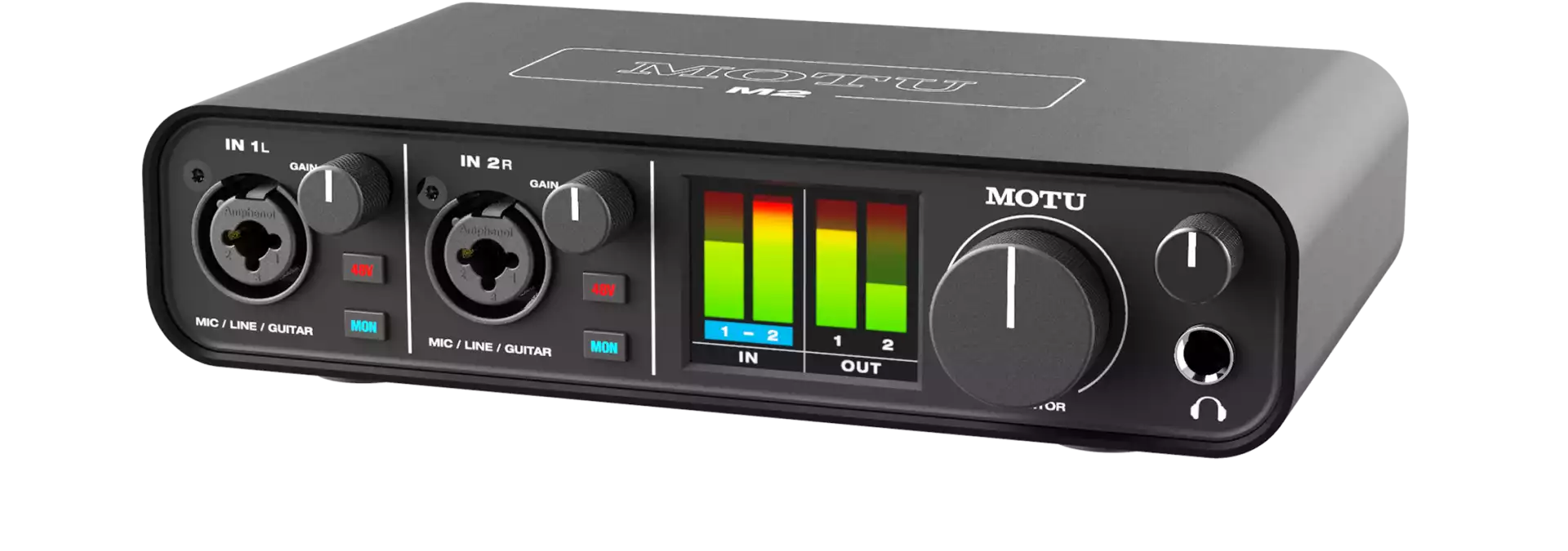
The M2’s metal case, large monitor knob, separate headphone level and full-color front meters make it easy to understand during a session. The meters are especially welcome because they show signal behavior without forcing the user to look at a software window. Two combo inputs, a dedicated instrument mode and rear MIDI ports keep the front uncluttered while offering more flexibility than many similarly sized interfaces. A compact unit still needs sensible cable management on a busy desk.
Features and connectivity
The M2 supports two microphone or line inputs, phantom power for condenser microphones, instrument input use, line outputs, headphone monitoring and MIDI in/out. USB operation and driver support should be checked for the buyer’s exact computer and operating system. The combination is enough for a solo artist, stereo source, two-person podcast or compact keyboard setup. It is not intended for full-band multitracking or multiple independent monitor mixes.
Sound and performance
Good recording begins with source and room, but an interface must be quiet, stable and easy to set correctly. The M2’s converter and metering specification make it well suited to spoken word, vocal, guitar and electronic-music work. Direct monitoring can help manage latency when recording. The right expectation is reliable capture and playback, not that an interface will compensate for a poor microphone position, untreated reflections or excessive recording level.
What to expect in a real setup
Install any required drivers or control software, select the M2 as input and output in the DAW, then test each source before a real recording. Enable phantom power only for microphones that need it. Set gains so the meters show healthy peaks with headroom, and compare direct monitoring with software monitoring to understand latency. If using MIDI, test note input and clock behavior before an important session.
Strengths
The M2 offers a mature feature balance for a small interface: two flexible inputs, useful meters, MIDI I/O and straightforward monitoring. The front display is more than cosmetic because it makes gain staging easier for beginners and faster for experienced users. It can serve a home studio for a long time if the work is mainly one or two sources at once.
Limitations to consider
Two inputs are a real limit for drum recording, full bands or elaborate hardware setups. It has no onboard DSP mixer for every workflow, and its value depends on computer compatibility and driver stability. Buyers who need several headphone mixes, ADAT expansion or many line outputs should start with a larger interface. Like every compact USB unit, it benefits from a stable computer and sensible USB cable routing.
Who should buy it?
Buy the MOTU M2 if you record vocals, guitar, a stereo source, podcasts or MIDI instruments and want clear metering in a compact interface. It suits home producers who value practical hardware feedback. Look elsewhere if your sessions need more than two simultaneous microphones, multiple performers’ headphone mixes or extensive external hardware.
Alternatives to consider
Audient, Focusrite, PreSonus and Universal Audio offer closely competing two-input interfaces with different software, preamp character and I/O. Compare MIDI needs, visual metering, driver support, included software and the exact sources you record. The M2 is especially attractive for users who want to see levels instantly on the hardware itself.
M2 key specifications
- Model
- MOTU M2
- I/O configuration
- 2-in / 2-out USB-C audio interface
- Inputs
- 2 × combo XLR/TRS mic, line or Hi-Z inputs
- Conversion
- 24-bit / 192 kHz
- DAC
- ESS Sabre32 Ultra DAC technology
- Main-output dynamic range
- 120 dB
- Mic preamp EIN
- -129 dBu
- Monitoring
- Full-colour LCD meters and direct monitoring
- Connectivity
- USB-C, MIDI I/O, 2 × balanced TRS outputs, RCA outputs and headphone output
Verdict
The MOTU M2 is a well-considered small interface that gives creators the essential tools to record properly without adding needless complexity. Its strong points are visibility, flexible inputs and MIDI inclusion. For a compact home studio built around one or two sources, it is a capable and sensible centerpiece.
Editorial record
Sources and updates
Product specifications and factual claims were checked against Official M2 product page ↗. Scores and buying advice follow our category-specific editorial methodology.
- Published
- July 17, 2026
- Last updated
- July 25, 2026
Compare before choosing
Two strong alternatives from the same audio interfaces category.