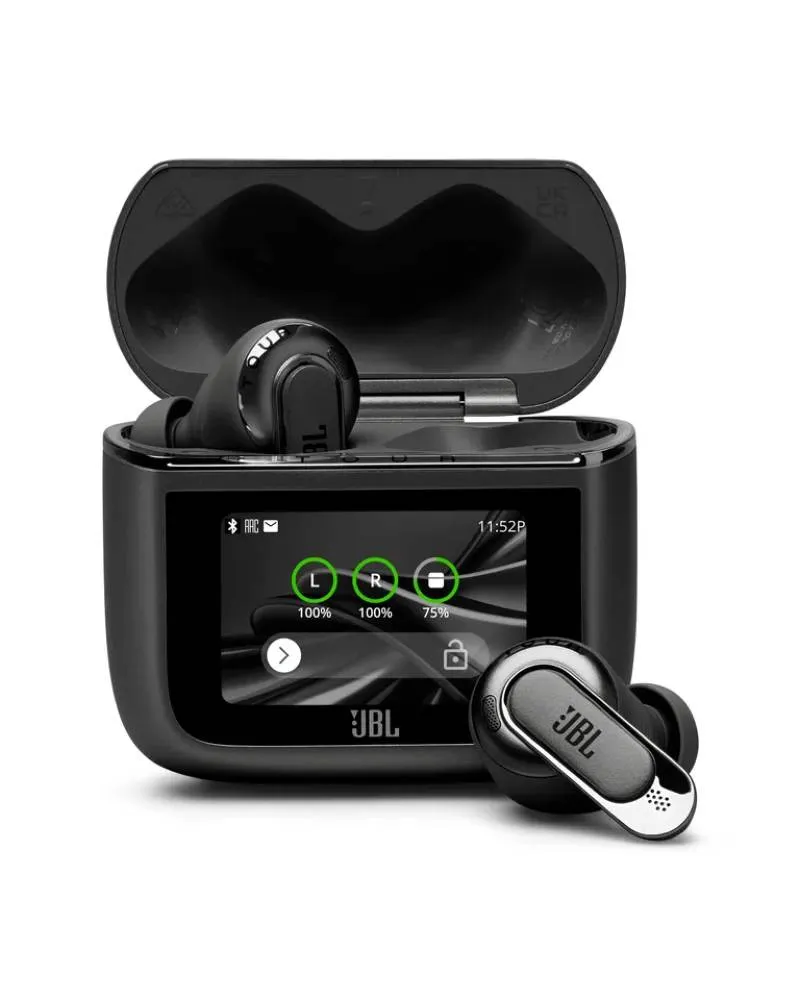
The JBL Tour Pro 3 makes its charging case a much larger part of the listening system than usual. Alongside a touchscreen, the case can send audio from compatible wired sources to the earbuds, extending their usefulness beyond a phone’s Bluetooth connection. That distinction is more important than the screen itself, and helps explain who can justify the premium package.
JBL Tour Pro 3 — The Smart Charging Case
JBL documents USB-C and analogue 3.5 mm connections for the case, with the appropriate leads in the package. Used as a transmitter, it can connect the earbuds to a suitable computer or an entertainment system with a headphone output. This is useful when the source cannot pair directly with wireless earbuds.
A frequent flyer is the clearest example, although aircraft socket arrangements vary and an additional physical adapter may be needed. The case also gives older music equipment a practical route into the system. Confirm that the source actually supplies a compatible audio output; a connector with the same shape is not always an audio source.
The touchscreen offers access to playback and settings without repeatedly reaching for a phone. That can be convenient at a desk or during travel, but it also makes the case more substantial than a basic charging box. If it will spend every session buried in a bag, the screen’s value is limited.
The transmitter function is the stronger reason to pay for this design. Someone who only listens from one phone should compare simpler earbuds before assuming a more elaborate case improves music in its own right.
Sound quality and ear tips
The Tour Pro 3 uses a hybrid arrangement combining a 10.2 mm dynamic driver with a balanced-armature driver. The design separates acoustic duties, but two drivers are not automatically superior to one. The integration, tuning and seal determine the result heard by the owner.
SoundGuys reports a consumer-friendly balance and finds the Studio preset useful for reducing bass emphasis. What Hi-Fi? describes solid, engaging sound while also discussing the effect of the supplied foam and silicone tips. These reports support a capable adjustable earbud, with configuration important to the final impression.
JBL provides different audio settings for the tip types. Select the setting that matches the installed tips before evaluating the tuning. Foam and silicone can differ in comfort, sealing and maintenance, so their effect should not be reduced to a simple rule that one is always better.
Use the app’s equaliser to make deliberate, modest changes. If the standard bass is too prominent, reduce that first rather than adding more high-frequency emphasis to make vocals stand out. Compare a familiar voice, a dense production and a quieter acoustic recording after each adjustment.
Personalised and spatial modes are optional tools rather than compulsory upgrades. Try them with content that you know, then return to ordinary stereo for comparison. The best setting is the one that makes listening comfortable and convincing across a session, not the one with the most dramatic effect in a short demonstration.
Noise control and comfort
Adaptive ANC and ambient listening modes make the Tour Pro 3 relevant to commuting and travel. A stable tip seal is essential to both bass and noise reduction. Use the fit-check facilities, then verify the result while talking and moving your head; a stationary fit test is only the beginning.
The substantial feature set does not make the earbud suitable for every ear. Check pressure after a meaningful listening period and make sure the housing does not interfere with the outer ear. A product that performs well acoustically can still be the wrong purchase if the owner has to remove it frequently for relief.
Noise cancellation should be assessed against the actual environment. Persistent aircraft rumble and nearby conversation are different challenges. A useful reduction that allows comfortable listening is more meaningful than a maximum marketing figure without comparable test conditions.
The ambient modes help with announcements and short conversations. They do not eliminate the masking effect of music or guarantee awareness outdoors. When understanding the surroundings is important, pause or lower playback instead of expecting microphone processing to solve the entire problem.
Connections, app and calls
The supported music options include SBC, AAC and LDAC, with multipoint for convenient switching between devices. LDAC requires a compatible source; an iPhone normally uses AAC. The case transmitter provides a separate route for appropriate wired sources, which is one reason codec support should not be considered in isolation.
The JBL Headphones app remains important even though the case has its own display. Firmware, equalisation, control assignments and personalised features benefit from proper setup. Spend time establishing a simple configuration rather than leaving every optional feature active without knowing which ones are useful.
Auracast support is documented, but a shared-audio routine still depends on compatible equipment and current firmware. Confirm the complete chain before making it the sole reason to buy. A capability in one product is not a promise that every nearby Bluetooth device supports the same function.
SoundGuys’ call assessment is positive about handling common background noise, with room echoes remaining a challenge. For a travel-and-work purchase, test a call from the usual laptop as well as the phone. Conferencing software and microphone mode can change the result even when the earbuds themselves are unchanged.
Battery, charging and durability
JBL’s official maximum is eleven hours of music with ANC off and eight with ANC on, with a larger combined total supplied by the case. SoundGuys obtained eight hours and seventeen minutes in its ANC-on test. That is useful independent support, while actual volume, features and source behaviour can alter endurance.
The continuous earbud time is the relevant figure for a long meeting or journey. The case-assisted total describes repeated recharging opportunities, not uninterrupted playback. Using the case as a transmitter also gives it another active job, so leave a sensible reserve rather than planning solely around the largest number on the box.
USB-C and wireless charging provide flexibility. The case’s screen and additional functions make a consistent charging routine worthwhile, particularly if it will be relied upon to connect a wired source during travel. Check remaining charge before leaving rather than discovering an empty transmitter at the destination.
The earbuds carry an IP55 rating. This describes resistance under defined conditions rather than suitability for swimming, and it should not be silently applied to the case. Dry the earbuds before charging and keep the additional case connectors clean and protected during travel.
Value and the right buyer
The Tour Pro 3 is easiest to recommend to someone who will use its unusual connection flexibility. Frequent travel, an older player with a headphone output or a computer arrangement that benefits from the case transmitter can make the package genuinely useful. The screen is a convenience on top of that functional advantage.
If the transmitter is unnecessary, the value calculation becomes more conventional. Compare sound preference, comfort, ANC and the price of simpler premium earbuds. A less expensive JBL model may already provide the features that matter, while another brand may fit the ear better.
European buyers should confirm the exact accessory package and warranty route. An expensive earbud should justify itself through a routine that becomes easier and more enjoyable. The Tour Pro 3 has a stronger argument than many feature-heavy products because its case can solve a specific connection problem; the owner should actually have that problem.
Alternatives to consider
JBL Live Beam 3: Compare the less elaborate package if a case screen appeals but the Tour Pro 3’s transmitter is unnecessary.
Bowers & Wilkins Pi8: Another premium option to assess for sound, fit and how its connection features suit the actual sources.
Technics EAH-AZ100: A useful all-round comparison when the main priorities are conventional wireless listening and device switching.
JBL Tour Pro 3 key specifications
- Drivers
- 10.2 mm dynamic plus balanced armature
- Music codecs
- SBC, AAC, LDAC; compatible source required
- Noise control
- Adaptive ANC and ambient modes
- Case functions
- Touchscreen and wired-source audio transmitter
- Battery claim
- Up to 11 hours ANC off / 8 hours ANC on
- Charging
- USB-C and wireless charging
- Resistance
- IP55 earbuds
Verdict
The JBL Tour Pro 3 is a capable premium earbud whose transmitter case gives it a clear practical identity. Sound adjustment, useful ANC and strong published battery results support the package. Its extra cost makes most sense for travellers and owners of wired sources; phone-only listeners should compare simpler alternatives before paying for facilities they will rarely use.
Primary documentation and independent reviews
JBL Tour Pro 3 official specifications · SoundGuys original Tour Pro 3 review · What Hi-Fi? original Tour Pro 3 review
Editorial record
Sources and updates
Product specifications and factual claims were checked against Official JBL Tour Pro 3 product page ↗. Scores and buying advice follow our category-specific editorial methodology.
- Published
- November 7, 2026
- Last updated
- November 8, 2026