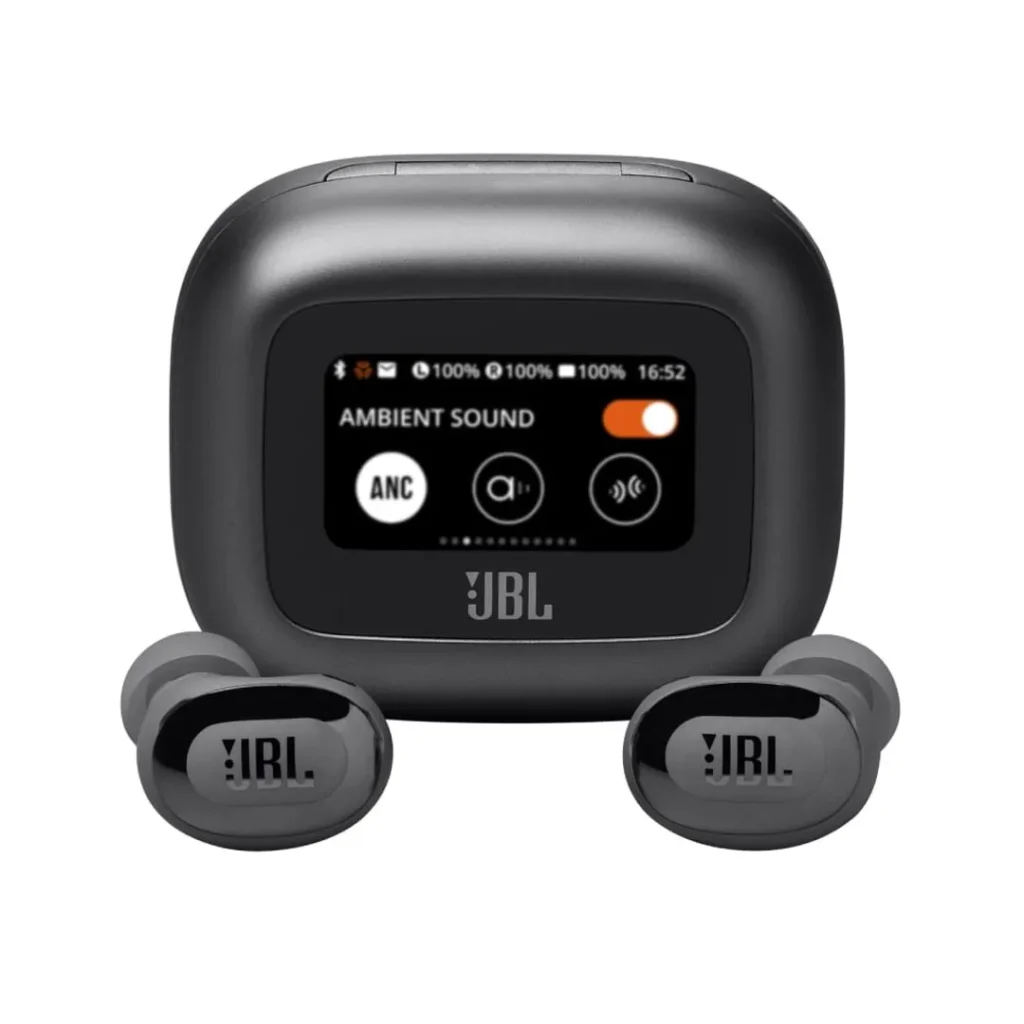
JBL Live Buds 3 brings the company’s touchscreen charging-case idea to a sealed, stemless earbud. The attraction is quick access to settings without repeatedly opening a phone app, backed by a broad set of personalisation options. Original evaluation supports a rounded everyday package but is less enthusiastic about upper-range spaciousness and microphone naturalness. It is worth considering when the case interface is genuinely useful, rather than assuming a small screen automatically makes the listening experience more professional.
Research-based review. This assessment draws on manufacturer documentation and the original published evaluations linked below. Audio Review has not performed a hands-on test of this model.
Choose the Buds shape rather than the family name
Live Buds 3 is the sealed bud-style member of the Live 3 family. It is different from the stemmed Beam and the unsealed Flex. The 10 mm driver and supplied ear tips belong to this construction; a neighbouring model’s longer battery headline or different fit should not be transferred across.
Try the tip sizes independently in both ears and check a longer session. A stemless outline can be convenient, but it does not guarantee less pressure or better retention for every ear shape. Make sure the controls remain accessible without disturbing the seal. Compare the actual shape with alternatives before treating shared electronics as the complete purchase decision. The correct family member is the one that fits and performs the required role. A screen-based case is less useful if the earbuds themselves need constant repositioning, while a comfortable sealed fit provides a more dependable starting point for evaluating sound and cancellation.
The touchscreen is an interface rather than a new source
JBL specifies a 1.45-inch touchscreen on the charging case for convenient access to supported controls. Its purpose is to reduce repeated phone-app visits for ordinary adjustments. That should not be confused with promising the wired-source transmission features found in some different JBL cases.
Set the earbuds up through the official app, then try the case for the commands used most often. Check readability, response and whether carrying it is more convenient than reaching for the phone or watch. Someone who often listens from a laptop or television may appreciate a separate settings surface. Someone whose phone is always in hand may see less benefit. Do not assume every supported setting appears on the screen in every software version. The useful test is whether it simplifies a real routine. If it does, the extra case size and cost can be justified; if not, simpler earbuds deserve equal attention.
Sound is competent with a restrained upper presentation
Basic Tutorials’ original listening account finds precise bass and detailed mids, but less air and liveliness in the upper range than some similarly priced alternatives. It supports good everyday listening while stopping short of a universal sound-quality recommendation.
Try a vocal, a busy recording and an acoustic track before deciding. Check whether the more contained upper presentation feels comfortable or leaves the music less engaging than preferred. Compare the app’s sound adjustments at similar loudness, without assuming every personalisation mode is an improvement. A listener who prefers a restrained balance may be happy, while another may want more openness. That difference matters more than the screen animation or a high-resolution badge. The best recommendation is enjoyment across the real music collection. A feature-rich product remains a listening device first, so the preferred tonal character should be established before additional controls are allowed to settle the choice.
Adaptive ANC and ambient modes need separate checks
The official sheet distinguishes ordinary ANC from True Adaptive ANC, with different runtime claims. Basic Tutorials finds useful cancellation but does not place it ahead of the strongest specialist alternatives. Its transparency assessment is more cautious, describing a processed character rather than an entirely natural open-ear impression.
Start with a comfortable seal and compare the two cancellation arrangements in a typical environment. Check steady rumble and nearby speech separately. A mode that reduces one effectively may leave the other noticeable. Try Ambient Aware and TalkThru for the interactions that actually happen during the day. Do not expect software to make a sealed earbud feel exactly like nothing is being worn. For frequent travel, compare isolation directly with a suitable rival. For office use, convenient mode switching may matter as much as maximum attenuation. The appropriate setting is the one that provides a useful, consistent result without creating unrealistic expectations about silence or awareness.
Calls are an important limit to the feature story
The manufacturer’s microphone array and adjustment options look comprehensive, but Basic Tutorials finds voice processing audible and overall microphone performance only moderate. That is a more useful buying caution than repeating a promise of perfect calls in every noisy environment.
Test the intended meeting application with its normal microphone selection. Ask another person about the beginning and end of sentences as well as steady speech. Compare a quiet room with the location where difficult calls normally occur. Voice-related EQ can be tried, but it should not be assumed to fix every limitation. Check multipoint with the actual phone and computer, including returning to music after a call. A pair that handles casual conversations adequately may still be less suitable for a workday built around meetings. The screen and long specification list should support dependable communication rather than distract from checking that fundamental requirement.
Battery figures and charging complete the decision
JBL claims up to ten hours from the earbuds with ANC off, eight with ANC and seven with True Adaptive ANC. The 40-hour total includes case recharges in the stated ANC-off arrangement. These are manufacturer maxima, not one continuous session or Audio Review measurements.
Plan around the selected mode and allow for calls, volume and battery age. The case supports USB-C and wireless charging, useful if either fits an existing routine. Check seating and contacts so both earbuds are ready after storage. The IP55 rating belongs to the earbuds; keep charging equipment dry and follow the care limits. Compare current European price, return terms and support with alternatives. Live Buds 3 is strongest when the fit, sound and screen controls work together. It is less compelling when the display rarely gets used or the main need is exceptional noisy-call performance. A simpler pair can be better value when it solves the same listening job with fewer compromises.
Alternatives to consider
JBL Tour Pro 3: An existing JBL comparison when the smart-case idea is attractive and the budget can stretch. Compare the actual additional functions, fit and sound instead of assuming that every touchscreen case behaves alike.
Nothing Ear (2024): A relevant alternative when preferred tuning and app adjustment matter more than a case display. Compare comfort and the complete current package before paying specifically for screen-based controls.
JBL Live Buds 3 key specifications
- Design
- Sealed bud-style wireless
- Driver
- 10 mm dynamic
- Earbud weight
- 4.6 g each
- Bluetooth
- 5.3 earbuds
- Case controls
- 1.45-inch touchscreen
- Noise control
- ANC, True Adaptive ANC and ambient modes
- Connections
- Multipoint
- Battery claim, ANC off
- Up to 10 h earbuds; 40 h including case
- Battery claim, ANC
- Up to 8 h earbuds
- Battery claim, True Adaptive ANC
- Up to 7 h earbuds
- Case charging
- USB-C and wireless
- Resistance
- IP55 earbuds
- High-resolution Bluetooth codec
- LDAC with a compatible source
Verdict
Live Buds 3 combines a useful smart-case interface with sealed comfort, broad adjustment and charging flexibility. Original evidence supports capable everyday listening while identifying microphone and upper-range limitations.
Try the fit and decide whether the touchscreen earns its place in the routine. If it does, the package is worth considering at a suitable price. If sound preference, calls or a smaller case lead the decision, compare simpler alternatives carefully.
Documentation and original reviews
JBL official UK Live Buds 3 product information · JBL official Live Buds 3 technical sheet · Basic Tutorials original Live Buds 3 listening, ANC and microphone evaluation
Editorial record
Sources and updates
Product specifications and factual claims were checked against Official JBL Live Buds 3 product page ↗. Scores and buying advice follow our category-specific editorial methodology.
- Published
- November 17, 2026
- Last updated
- November 17, 2026