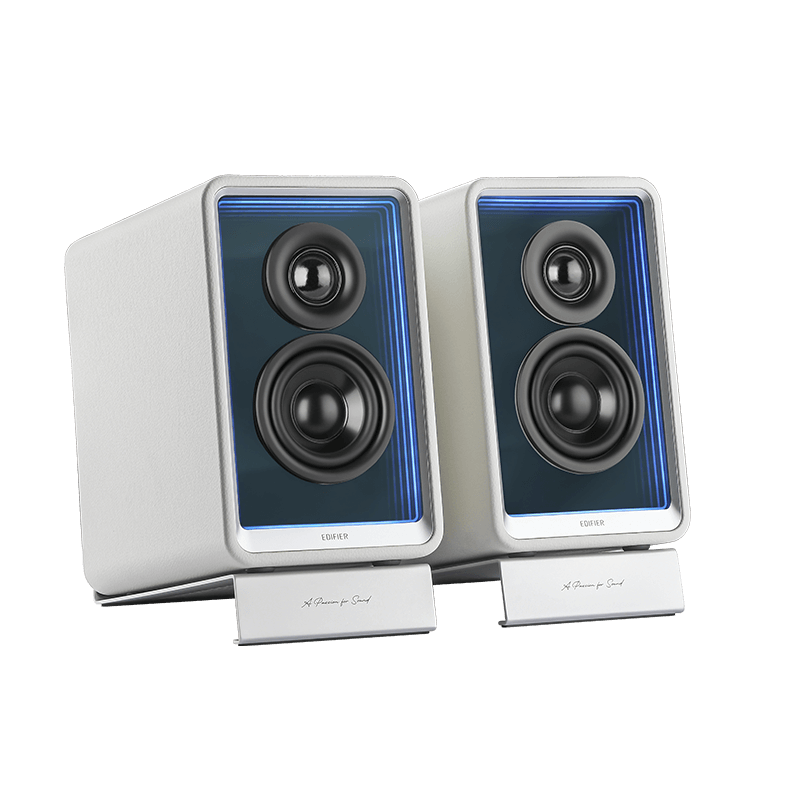
Edifier QR65 combines compact stereo speakers, a conspicuous lighting design and a USB charger in one desk-oriented package. USB audio, analogue line input and Bluetooth provide the source routes, while the EDIFIER ConneX mobile app handles additional controls. The supplied angled supports make its intended near-desktop role clear. It is not a miniature AV receiver or a Wi-Fi streaming system. Original evaluation finds enjoyable warm music playback, while raising questions about dialogue balance and the computer operating routine. The best buyer is someone who will use the whole package rather than simply admire the lights.
Research-based review. This assessment draws on manufacturer documentation and the original published evaluations linked below. Audio Review has not performed a hands-on test of this model.
Warm music playback comes with dialogue qualifications
TechRadar’s original review describes warm, bass-forward music with clear treble, but finds some middle frequencies less prominent and occasional film dialogue muffled. It also finds the maximum output insufficient for its larger living-room expectations. These are useful context-specific observations rather than proof that every desk or room will give the same result.
For an audition, use spoken material as well as music. A speaker chosen for a computer may spend as much time playing calls, tutorials or video as albums. Check clarity at ordinary quiet levels, not just with a lively demonstration track. Try the supplied placement supports and a sensible listening distance before reaching for EQ. If speech remains difficult to follow, do not assume that extra bass or a subwoofer will solve the problem. The compact format is most persuasive when it gives an enjoyable and intelligible result close to the user. A larger room should be treated as a separate demand, with a suitable alternative compared directly rather than inferred from the advertised amplifier figure.
The supplied stands help, but the desk still matters
The package includes angled desktop supports. The pair nevertheless requires a cable between the main and partner cabinets, a mains connection and room for the source cables. Compact dimensions reduce the footprint without removing those practical needs.
Place both speakers securely and leave access to the main cabinet’s controls. Avoid positioning one directly behind a large screen while leaving the other unobstructed. Check whether the angle points usefully toward the listening position and whether the desk creates an obvious reflection or vibration problem. A small change in height or spacing may be more useful than buying another accessory immediately. Keep cables away from moving chair parts and from places where they can be pulled by a laptop. Lighting should remain comfortable in the actual work environment, particularly during darker evening use. A desk system succeeds when its appearance, control access and sound all work together. It is less convincing when the visual effect dictates a position that compromises the stereo arrangement.
USB audio and USB charging are separate functions
QR65 has a dedicated USB audio input as well as USB charging outputs. The official manual explicitly distinguishes the supplied audio connection cable from a charging cable. The presence of several USB sockets therefore does not make them interchangeable.
Identify the labelled input before connecting the computer, then select the correct output device at a conservative volume. Check normal system audio, the main music application and any calling software. Test waking the system and changing sources during the return period. TechRadar’s review found the manual power routine inconvenient with its computer setup, so it is worth confirming how that workflow feels in the intended installation. Do not assume that turning a computer off or on will automatically produce the desired speaker state. Equally, an observation from one review should not be presented as a permanent fault in every present-day software combination. The important result is an operating sequence that remains clear and reliable without repeatedly reaching behind the computer or changing unrelated sound settings.
The charger is shared capacity, not three full-power supplies
Edifier specifies a maximum 65 W charging system with two USB-C outputs and one USB-A charging output. The available allocation changes when multiple devices are attached. It should not be described as three independent 65 W chargers.
Compare the documented combinations with the actual laptop, phone and accessories. A device must support the relevant charging arrangement, and the cable must be appropriate for the required power. A speaker with a charger may reduce desk clutter if it replaces an existing adapter usefully. It offers less value if the main laptop needs a different capacity or a dedicated dock already provides the same job. Keep charging requirements separate from audio quality during the comparison. A convenient power feature can justify part of the package price, but it does not make the speakers more accurate or remove the need for sensible placement. The best decision is based on a short list of real devices and a realistic simultaneous charging routine rather than the largest number printed beside one socket.
Mobile app, lighting and Bluetooth shape the experience
The documented control app is EDIFIER ConneX. It supports additional sound and lighting functions, while Bluetooth provides audio from a compatible sending device. LDAC depends on source support; the presence of the codec does not mean every phone uses it or that the link is lossless.
Install the correct app through the normal official route and check the functions actually needed. Test changing a sound preset, lowering light brightness and returning to the desired source. A phone-based control scheme may be convenient beside a computer, or it may be an extra device the user would rather avoid during work. Do not buy on the assumption that an equivalent desktop application is included. For video or games, assess synchronisation with the intended source instead of relying on the Bluetooth version number. A USB route may be the more practical choice for a fixed workstation. The lighting is a genuine design feature when it suits the desk, but it should remain adjustable enough to support ordinary use rather than dominate it.
Choose a desktop package rather than a universal room system
The RCA line input and subwoofer output give QR65 some additional flexibility. It has no optical or HDMI input and no built-in Wi-Fi music platform. Those limits should be considered before attempting to make it the centre of a television or multiroom installation.
For an analogue source, establish the correct signal level; a conventional turntable still needs a suitable phono stage. If deeper bass is required, compare placement first and then the complete cost of an appropriate subwoofer arrangement. A larger speaker pair may be a simpler alternative than expanding a compact desk system. Include the value of the supplied supports and charger only where they will be used. Compare current local warranty and return terms, since the daily computer routine is best assessed in the actual workspace. QR65 is most convincing as a deliberately styled desk package with useful extras. It is less convincing when purchased mainly for a certification badge while its charging, lighting and mobile-control features add little to the intended listening routine.
Alternatives to consider
KEF LSX II LT: Compare this compact connected pair if its network and television facilities matter more than an integrated charger or lighting. Include the actual source and placement requirements in the price comparison.
WiiM Amp: A separate amplifier with suitable passive speakers is a different route for a desk or small room. It needs more component space, but allows speaker size and future replacement to be chosen independently.
Edifier QR65 key specifications
- Format
- Powered main cabinet and wired partner
- Drivers
- 1.25-inch tweeter and 2.75-inch bass/mid per cabinet
- Audio power rating
- 70 W total RMS, manufacturer figure
- Inputs
- USB audio, RCA line level, Bluetooth
- Bluetooth
- 5.3; LDAC on compatible sources
- App
- EDIFIER ConneX mobile app
- Subwoofer
- Dedicated output
- Included supports
- Angled desktop stands
- Lighting
- TempoAbyss effects, adjustable
- Charging
- Two USB-C and one USB-A output; 65 W maximum shared system
- TV digital input
- No HDMI or optical
- Network streamer
- Not built in
- Dimensions (W × H × D)
- 141.5 × 213 × 216.8 mm active; 130 × 213 × 212 mm passive
- Net weight
- 5.3 kg
Verdict
QR65 is an appealing compact desk package when its sound, adjustable lighting and shared charger all serve a real purpose. Original evaluation supports enjoyable warm music but flags speech and larger-room limitations. Check USB routing, source control and everyday wake behaviour before deciding. Its value is strongest as a complete desk solution rather than a universal replacement for larger stereo or television systems.
Documentation and original reviews
Edifier official QR65 specifications and charging allocation · Edifier official QR65 user manual · TechRadar original QR65 listening and desktop-use evaluation
Editorial record
Sources and updates
Product specifications and factual claims were checked against Official Edifier QR65 product page ↗. Scores and buying advice follow our category-specific editorial methodology.
- Published
- November 17, 2026
- Last updated
- November 17, 2026