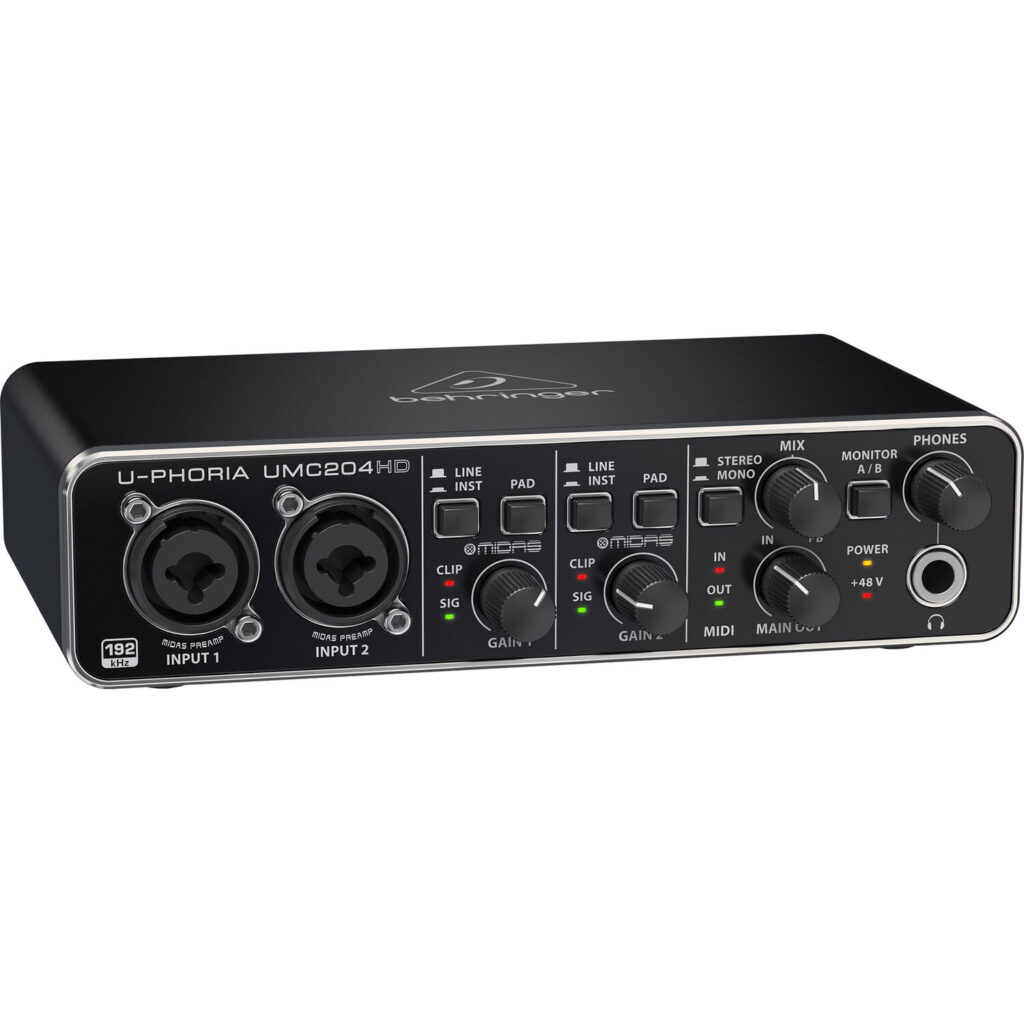
The Behringer U-PHORIA UMC204HD offers a useful connection mix for a budget interface: two preamps, four playback channels, MIDI and analogue insert points. Those facilities can matter more than chasing the largest conversion-rate number. Its value depends on whether the current driver support and monitoring arrangement suit the computer and recording task.
Behringer U-PHORIA UMC204HD — Two recording channels with useful input options
Behringer documents two combination XLR/quarter-inch inputs with Midas-designed preamps, line/instrument selection, pads and switchable 48 V phantom power. These are options for the two recording channels, not additional independent inputs to record everything simultaneously.
Choose the correct signal type and check microphone requirements before enabling phantom power. A guitar pickup, a line-output synthesiser and a microphone present different matching needs. Leave recording headroom for the loudest part of the performance rather than trying to keep a meter near its maximum throughout.
Analogue inserts create a distinct use case
Each input has a quarter-inch TRS insert connection, allowing suitable external processing in the analogue path. That is a useful difference from many simple desktop interfaces, but an insert socket is not a balanced line output or an extra microphone input.
Use the correct send/return wiring and understand that processing in this path can be committed to the recording. A compressor set badly cannot necessarily be undone later. Start with a simple unprocessed capture and add hardware only when its purpose and gain structure are clear.
Monitoring and four-output routing
The mix knob balances input monitoring with computer playback, and the monitoring controls provide useful listening choices. A direct input path avoids the full DAW round trip, but does not make computer plug-ins or virtual instruments instantaneous. Buffer and CPU settings still matter for those tasks.
Behringer lists two main TRS outputs and four RCA playback connectors for the four-output architecture. Physical socket count should not be converted into six unrelated playback channels. Check which connectors share the relevant output signal and how the headphone A/B selection fits the intended cue workflow.
MIDI, USB and current computer support
The five-pin MIDI input and output can connect suitable keyboards and sound modules. MIDI is control data, not the synthesiser’s audio, so a hardware instrument may still need an analogue input connection to record its sound. Plan both paths if the goal is to sequence and capture an external keyboard.
The interface uses USB 2.0 Type B and is bus-powered. The product page describes class-compliant Mac operation and a downloadable Windows driver. Verify current support for the exact operating system rather than relying on an old generic minimum-version statement. A suitable cable and a dependable USB port are part of a stable setup.
Up to 24-bit/192 kHz conversion is documented, but higher rates increase storage and processing demand without automatically improving a home recording. Spend first on correct source levels, microphone placement and monitoring. We have not measured preamp noise, output distortion or round-trip latency, so this review does not claim that the interface outperforms a newer competitor.
What to expect in a real setup
Does zero-latency monitoring include my DAW plug-ins? No. Direct monitoring avoids the computer path for the input. Plug-in monitoring still travels through the host and its buffer.
Does MIDI carry the audio from a keyboard? No. MIDI carries performance and control data. Record the keyboard’s sound through an appropriate audio connection as well.
Alternatives to consider
MOTU M2: A relevant two-preamp alternative when front-panel metering and a different control layout matter more than analogue insert points.
Focusrite Scarlett 2i2 4th Gen: Compare the newer two-preamp workflow if its control features and current support justify a larger budget.
Planning an insert-based recording chain
The UMC204HD’s inserts make it interesting for someone who already owns suitable analogue processing. Start with a clean microphone recording, then add the external processor and compare the result at similar playback levels. Confirm the insert cable’s send and return wiring and establish sensible levels at every stage. An insert is part of an audio path, not a spare input that can accept another independent musician. Misunderstanding that role can make a compact interface appear more expandable than it is.
A hardware compressor used while recording can help create a chosen production sound, but a poor setting may be committed to the file. Listen for exaggerated breaths, reduced attack or an unwanted pumping balance before recording a full take. For a beginner, learning gain and microphone technique with an unprocessed path first is often more useful than assembling a complicated chain.
Four playback channels in a practical project
An additional playback pair can serve a defined task, such as a separate software send to suitable equipment. Name the outputs in the DAW and verify the physical destination with the receiving level down. The mirrored connection formats must be understood before assuming that every socket can carry a different signal. Document the headphone selection and monitoring mix so that a musician can hear the intended backing track without affecting the recorded input level.
For a small live playback project, rehearse the complete arrangement before the event: computer, interface, session, cables and the destination equipment. A successful music-player test is not enough if the real task also involves recording inputs or sending separate tracks. Keep a simple recovery plan in case the application selects another audio device.
Judging budget value honestly
The useful saving is the cost of the complete working setup, including suitable cables and any hardware processor bought for the inserts. Purchasing outboard equipment only to use an available socket can erase the interface’s budget advantage. Compare a simpler two-input alternative if MIDI and extra playback routing will remain unused. Choose the UMC204HD when those specific connections are helpful, and establish current computer support before purchase. Its feature list can describe a useful studio tool without implying independently verified superiority in noise, latency or sound quality.
Behringer U-PHORIA UMC204HD key specifications
- USB architecture
- 2 inputs / 4 outputs
- Preamps
- 2 Midas-designed
- Conversion
- Up to 24-bit/192 kHz
- Input connectors
- 2 XLR/quarter-inch combo
- Analogue inserts
- 2 quarter-inch TRS
- Main outputs
- 2 quarter-inch TRS
- Playback sockets
- 4 RCA, within four-output architecture
- MIDI
- 5-pin input and output
- USB connector
- USB 2.0 Type B
- Power
- USB bus power
Verdict
The UMC204HD is most useful when its inserts, MIDI and output options solve specific budget-studio needs. Confirm the computer driver and draw the routing before purchase. Its connection flexibility is a concrete attraction, while sound and stability claims require testing with the actual setup.
Primary documentation
Specifications and feature descriptions were checked against the following official documents on 6 November 2026. Compatibility advice is our interpretation of those documented capabilities; it does not establish measured sound quality. Regional bundles, software features and service availability can change, so verify the exact European model and current support information before purchase.
Editorial record
Sources and updates
Product specifications and factual claims were checked against Official Behringer U-PHORIA UMC204HD product page ↗. Scores and buying advice follow our category-specific editorial methodology.
- Published
- November 7, 2026
- Last updated
- November 8, 2026