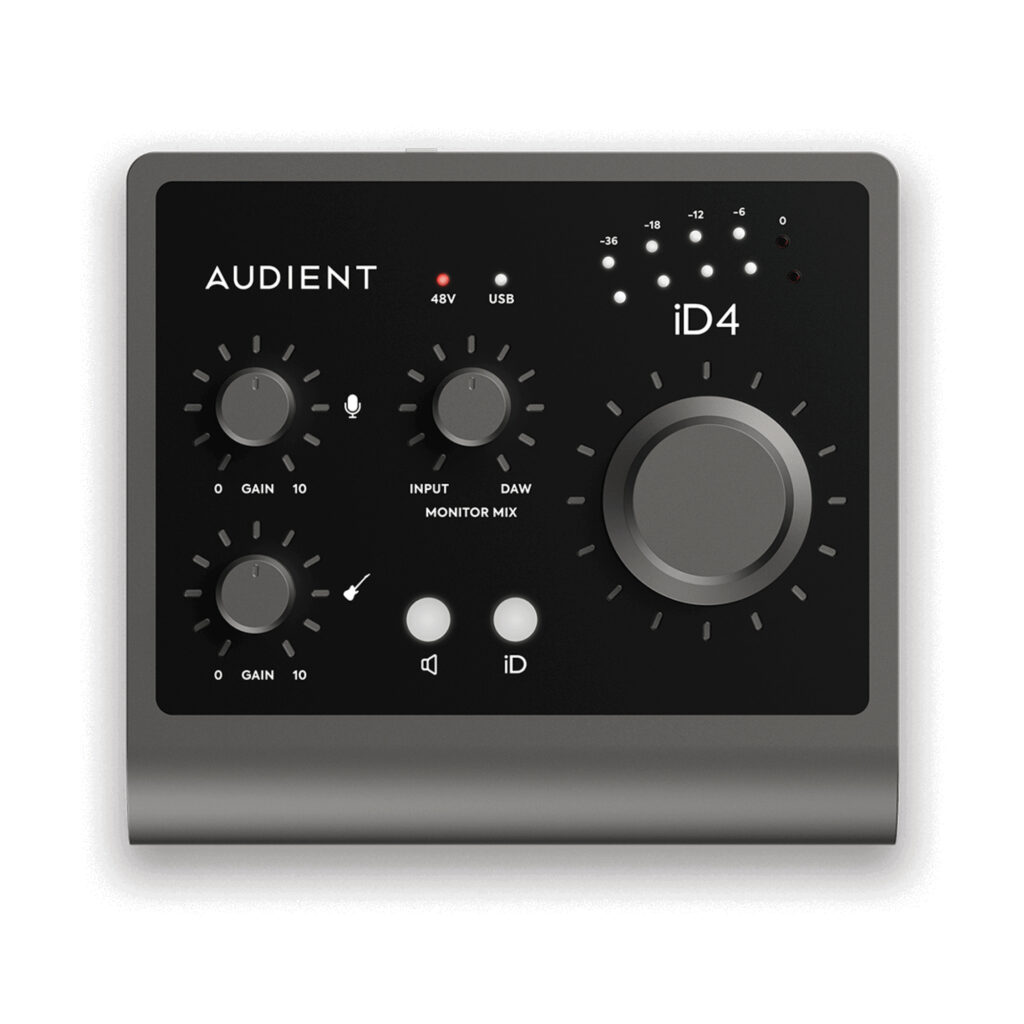
Audient iD4 MKII is a small interface with a particularly clear intended session: one microphone and one instrument. That simplicity can be a benefit for a solo recording desk, but the two-input label should not be mistaken for two interchangeable microphone or stereo line paths. The original evaluation is strongly positive about sound and construction, with reservations about flexibility. This assessment concerns the MKII generation, keeping it separate from later naming and converter-platform changes on Audient’s current website.
Research-based review. This assessment draws on manufacturer documentation and the original published evaluations linked below. Audio Review has not performed a hands-on test of this model.
One microphone and one instrument is the essential layout
The rear combo input and front instrument socket form different recording paths. A typical singer with a guitar can use both together. Two microphones or a conventional stereo line source require a different input arrangement, so the model should not be chosen merely because its total says two.
Write down the busiest session expected over the next year. If that includes a second vocalist, a stereo keyboard or a pair of microphones on one instrument, compare a more suitable interface before ordering. Adding an adapter does not create a second microphone preamp. The compact arrangement can still be excellent value when the intended source list is stable. A solo musician overdubbing one part at a time may never need more. The useful decision is whether this layout fits the actual recording method, not whether a higher channel count looks more professional. Avoid buying an unsuitable interface and then spending on complicated workarounds that undermine its original simplicity.
The sound evidence is stronger than the feature count
Sound On Sound’s original assessment praises the microphone and instrument recording result and the solid build. That supports the iD4 MKII as a quality-focused small interface, while the same review is clear about its limited versatility.
For a practical audition, record the actual voice, microphone and instrument used most often. Keep levels comfortably below clipping and compare takes without a loudness advantage. Listen for whether ordinary quiet passages remain usable and whether the performance feels natural to monitor. The interface is one part of the result: microphone placement, the room and the musician’s comfort still deserve attention. A specification improvement cannot compensate for a noisy recording location or a poor performance. Establish a clean repeatable recording process before spending on another converter. The most compelling buyer can meet the input requirement and then benefit from the straightforward hardware, rather than needing to sacrifice the session layout in pursuit of an attractive technical number.
Monitor Mix is useful when its role is understood
A dedicated blend control balances the live input against computer playback. This allows a direct monitoring route without requiring the input to travel through the recording application’s full processing chain. It does not make software effects or every part of a computer session latency-free.
Choose one intended monitoring path and check for an unwanted doubled signal. If direct monitoring and delayed software monitoring are both audible, the result can be confusing. A singer wanting a simple dry reference may find the hardware blend ideal. A guitarist relying on an amplifier simulation needs to assess the computer’s software-monitoring performance instead. Test a realistic project with the usual plug-ins rather than an empty session alone. Use a stable buffer setting and prioritise a clean performance over the smallest displayed number. The value of the control is immediate access to a familiar balance during recording. Its limitation is equally clear: it cannot remove processing delay from a sound that must be created inside the computer.
Two headphone sockets are not two independent mixes
The socket sizes make connecting different headphones convenient. On iD4 MKII they do not provide separate performer mixes or a dedicated headphone level independent of the main output. That distinction matters when speakers and another listener are involved.
Consider how the desk will be used during recording. If the performer and engineer need different backing-track balances, this hardware is not automatically sufficient because two plugs fit. If speakers must remain quiet while recording a microphone, establish a safe repeatable output routine before a session. Test the actual headphones at a sensible level and verify that there is enough useful adjustment for quiet and louder source material. Do not infer universal headphone suitability from impedance alone, since sensitivity and listening demand also matter. For one owner working alone, shared control may be an acceptable simplification. For a growing collaborative setup, independent routing and levels can be worth choosing at the outset rather than adding extra equipment later.
USB power and software compatibility deserve an early check
The support specification defines host-current requirements and notes that the available power affects headphone output capability. A USB-C connector alone does not establish that every cable, adapter or host port provides the intended operating conditions.
Check the exact computer and current supported driver before buying, then test the normal connection directly during the return period. A crowded hub or an unsuitable cable can make a simple desk less reliable. Confirm playback, recording, sleep recovery and reconnection with the actual working arrangement. If using mobile equipment, follow the documented compatibility and power requirements rather than assuming a change of connector is enough. The original MKII’s recording format should also be distinguished from converter-chip language or later product-generation specifications. Compare like with like when reading a current listing. A reliable supported connection is more useful than a theoretical capability that has not been demonstrated on the intended host. Keep the setup simple while establishing that reference.
Loopback adds a useful role without adding physical inputs
The iD software supports bringing computer playback into a recording or streaming route. This is useful for a solo creator, but does not change the number or type of analogue sources that can be connected at once.
Build a small test session before using it for an important stream. Identify which application supplies playback, which receives the microphone and where the combined signal is monitored. Check that an output is not routed back into itself, and listen to a short recording through a separate playback check. A video call may also require careful routing so that a guest does not hear an unwanted delayed copy. Save a working configuration once it is understood. For a musician occasionally creating tutorials, this can add meaningful value to a compact interface. For several guests with separate microphones, the physical input requirement still takes priority. Software flexibility is most useful when it complements a suitable hardware layout rather than attempting to replace channels that are not present.
Alternatives to consider
Audient iD14 MKII: iD14 MKII is worth comparing when two microphone inputs and digital input expansion are useful. Check simultaneous source count and headphone routing rather than treating all desktop iD models as interchangeable.
Focusrite Scarlett 4i4 4th Gen: Scarlett 4i4 provides a useful alternative desktop workflow. List the microphone, instrument and stereo line sources that must record together, then compare those requirements with the actual available paths.
Audient iD4 MKII key specifications
- Version
- iD4 MKII, not later iD1 MK3 platform
- USB recording
- 2 analogue inputs / 2 analogue outputs
- Mic / line
- One rear combo input
- Instrument
- Separate front JFET input
- Mic gain range
- 58 dB
- Resolution
- Up to 24-bit / 96 kHz for original MKII
- Speaker output
- Balanced stereo TRS pair
- Headphones
- 6.35 mm and 3.5 mm sockets; shared feed and main level control
- Monitoring
- Hardware input/playback blend
- Loopback
- Supported through iD software
- Power
- USB bus power; adequate host current required
- Expansion
- No ADAT input
Verdict
iD4 MKII is an appealing compact interface for a clearly defined solo session. Original evidence favours its recording quality and construction, while the direct-monitor blend is practical. The single microphone input, shared headphone arrangement and absent expansion are the deciding limitations. Confirm host power and the correct generation, then choose it when the supplied layout already meets the work rather than hoping to expand it later.
Documentation and original reviews
Audient official iD4 MKII technical support specifications · Audient official original iD4 MKII manual · Sound On Sound original iD4 and iD14 MKII evaluation
Editorial record
Sources and updates
Product specifications and factual claims were checked against Official Audient iD4 MKII product page ↗. Scores and buying advice follow our category-specific editorial methodology.
- Published
- November 17, 2026
- Last updated
- November 17, 2026