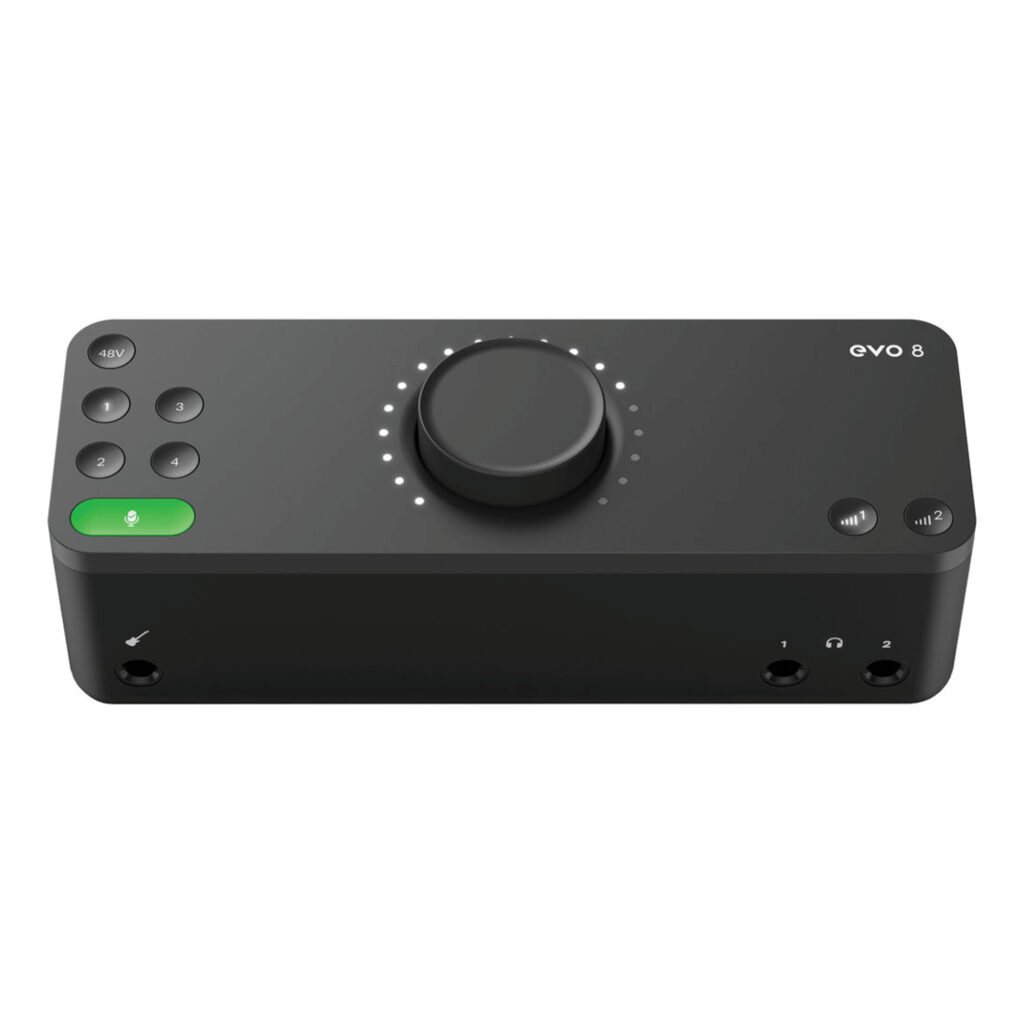
Audient EVO 8 offers four microphone preamps without the usual row of gain knobs. Smartgain and a single main control are intended to make recording easier, while the software mixer supplies the wider view. Its appeal is practical: a small collaborative session can need more inputs than a typical two-preamp desktop unit, even when the owner does not want a complex studio interface. The strongest recommendation depends on embracing that workflow, confirming the host-power requirements and understanding which connections share channels.
Research-based review. This assessment draws on manufacturer documentation and the original published evaluations linked below. Audio Review has not performed a hands-on test of this model.
Four preamps cover useful small sessions
The four rear combo inputs can serve several microphone or line sources. The front instrument connection replaces the first channel’s other input rather than creating a fifth recording path. That layout is useful for a small group, provided the actual simultaneous source list fits.
For example, plan whether a stereo instrument will occupy two channels before adding voices or another microphone. A four-input session can become full quickly. Write down both the recording sources and the monitoring needs, including who requires a separate headphone balance. Buying from that plan is more reliable than assuming four preamps cover every future collaboration. A musician overdubbing alone may not need all four, while a small acoustic ensemble may appreciate them immediately. The EVO 8 is persuasive when the extra channels are regularly useful and its compact interface remains easy to operate. It is less compelling when a required digital expansion or MIDI connection has been assumed without checking, since neither is part of this model.
Smartgain is a setup aid rather than a rescue process
Sound On Sound’s original trial finds Smartgain effective across several sources and regards it as a genuine improvement to the recording routine. The same evaluation is positive about recording quality and practical performance. This supports the feature’s usefulness without suggesting it can repair a badly captured take.
Perform a representative soundcheck using the loudest realistic passages. If the musician changes distance, instrument output or playing intensity substantially afterward, check the result again. Keep a sensible margin rather than attempting to record as close as possible to clipping. A level chosen from a quiet rehearsal cannot predict every later peak. Manual adjustment remains useful when the intended artistic result requires a different balance. The benefit is faster preparation with less uncertain knob turning, particularly for an owner learning to record several people. It does not replace listening, microphone placement or checking the recorded file. Establish good habits around the assistance so that the simplified process remains repeatable when the session becomes more demanding.
The single knob trades clutter for a different overview
The original evaluation notes that the selected channel and illuminated ring do not show every setting at once. It also finds the software mixer helpful in filling that gap. This is a design choice to try rather than assuming fewer controls always means easier operation.
Imagine adjusting one performer while watching several other inputs. A row of dedicated controls can make that immediate, while a single-control interface requires attention to the selected function. Try the actual sequence before purchase if live changes are central to the work. For a stable setup with gains established before recording, the minimal layout may be pleasantly calm. For frequent fast interventions, a more visible hardware overview may be preferable. Keep the software view accessible where it provides the information needed. The right choice depends on how the owner works under pressure, not just how tidy the desktop looks. A simplified surface earns its place when it reduces distraction without making essential checks harder during a take.
Headphone routing should be tested with the performer
EVO 8 supports an artist-mix arrangement through its software, allowing a separate monitoring balance. Its headphone and speaker behaviour should be checked in the actual setup rather than inferred from the number of sockets alone.
Build a short trial with the intended headphones and speakers. Confirm which output changes when a control is turned and what happens when headphones are connected. The original review discusses automatic speaker muting, so make sure that behaviour fits the session and current software configuration. A performer in the same room may welcome quiet speakers; someone monitoring a musician in another space may have different needs. Test talk and backing-track levels at a sensible volume before a recording begins. Save the working routing after it is understood. Independent balance is useful only when everyone hears the intended signal reliably. A few minutes spent checking the complete monitoring path can prevent an otherwise capable interface from feeling confusing during a collaborative session.
Four phantom-powered channels require the right host route
Audient’s official specifications limit phantom-power availability to two channels on a USB-A host connection. The full four-channel use therefore needs the documented suitable power arrangement. The shape of a USB-C socket alone is not a complete power specification.
Check the actual microphones and computer before buying for a four-person session. Confirm the cable and port rather than relying on an adapter that happens to fit. Test with all intended microphones connected, recording and monitoring together. If mobile use is planned, follow Audient’s supported compatibility and power guidance. Avoid treating a successful low-demand trial with one source as proof of a more demanding arrangement. The limitation may be irrelevant for a guitarist and one condenser microphone, while it is central for four phantom-powered sources. That makes it a purchase-planning question rather than a universal flaw. A reliable supported setup matters more than an attractive maximum input count that cannot be used as intended on the available host.
Loopback and compact construction define the wider value
The software mixer adds loopback for computer audio, while the physical case uses plastic rather than the heavier metal construction of some rivals. The original review considers the interface capable, with the hardware overview and material choice among its compromises.
For streaming, map the desired computer and microphone routes and make a test recording before going live. Check for feedback or duplicated monitoring and confirm what the audience actually receives. For mobile recording, pack the interface so that its sockets and controls are protected rather than expecting a compact case to tolerate careless treatment. Compare the complete cost against the number of preamps and mixes genuinely needed. A simpler two-input unit may suffice for solo work, while an expandable interface may make more sense for a growing studio. EVO 8 earns its value between those cases: enough analogue capability for useful collaboration, with assisted setup and software flexibility. Choose it because that combination matches the work, with its limits understood from the start.
Alternatives to consider
Audient iD14 MKII: iD14 MKII is worth comparing when two microphone inputs and digital input expansion are useful. Check simultaneous source count and headphone routing rather than treating all desktop iD models as interchangeable.
Focusrite Scarlett 4i4 4th Gen: Scarlett 4i4 provides a useful alternative desktop workflow. List the microphone, instrument and stereo line sources that must record together, then compare those requirements with the actual available paths.
Audient EVO 8 key specifications
- Recording
- Four analogue input channels / four output channels
- Mic / line inputs
- Four rear combo connections
- Instrument
- Front JFET socket shares input 1
- Mic gain range
- 58 dB
- Resolution
- Up to 24-bit / 96 kHz
- Smartgain
- Automatic initial gain setting; manual adjustment available
- Speaker outputs
- Two stereo TRS pairs
- Headphones
- Two sockets, artist-mix routing supported
- Loopback
- Supported by software mixer
- USB power
- Adequate USB-C host for four phantom channels; USB-A limited to two
- MIDI / ADAT
- Neither
- Size / weight
- Approximately 190 × 70 × 70 mm / 475 g
Verdict
EVO 8 is a strong practical option for small sessions that need four preamps and appreciate Smartgain. Its software mixing and artist monitoring add useful scope, while the single-knob overview and USB phantom-power limits require a deliberate setup. Confirm the source count and power route, then judge the workflow with real performers. It is most persuasive when its compact analogue capability is sufficient without relying on later expansion.
Documentation and original reviews
Audient official EVO 8 specifications and USB power limits · Audient official EVO 8 documentation · Sound On Sound original EVO 4 and EVO 8 evaluation
Editorial record
Sources and updates
Product specifications and factual claims were checked against Official Audient EVO 8 product page ↗. Scores and buying advice follow our category-specific editorial methodology.
- Published
- November 17, 2026
- Last updated
- November 17, 2026